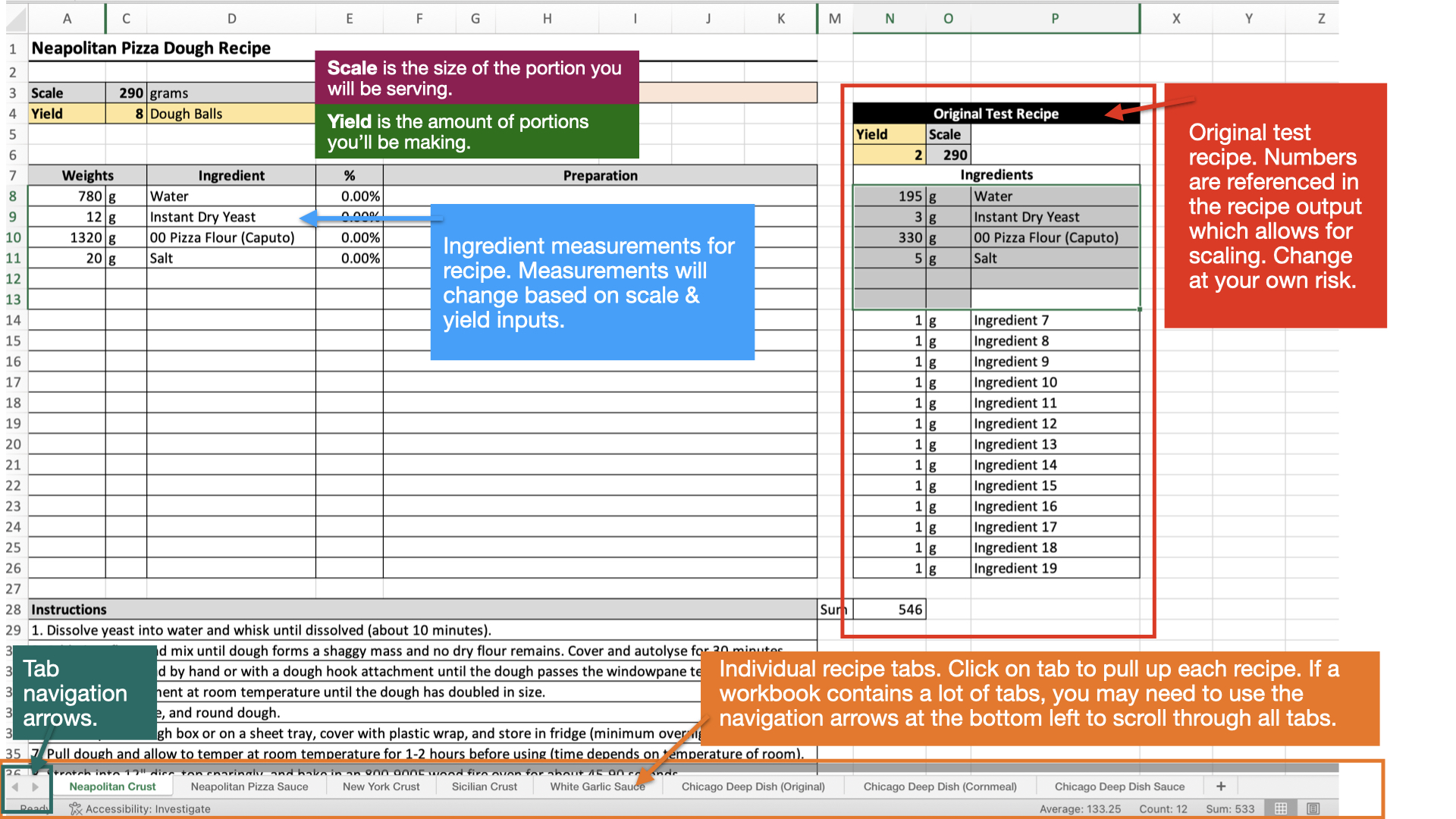
One of the most valuable tools I offer in my courses at ChefJacob.com is the downloadable Excel Recipe Workbook. While the lessons include detailed recipes, this workbook is a true game-changer for anyone serious about elevating their craft. It’s loaded with pre-formatted recipes designed for maximum efficiency—so you can spend less time on math and more time cooking.
Key Features at a Glance
Understand Ratios Like a Pro: Recipes in baker’s percentage format help you grasp the underlying ratios and patterns. Over time, you’ll spot trends that make you faster and more intuitive at creating your own recipes.
Effortless Scaling: Need to make more or less? Adjust the portion size or total yield in seconds—no manual recalculations required.
Ready-to-Print Convenience: Each recipe lives on its own tab, perfectly formatted for an 8.5 x 11” page. Print, use, and toss—or store them in a three-ring binder. For recipes you use often, protective sleeves keep them clean and organized.
Trim-Smart Reformulation: Got extra scraps from trimming or butchering? No problem. Reformulate recipes based on the amount of a single ingredient you have—ideal for dishes like salmon rillettes or pâtés made from leftover cuts.
No Life Story in Sight: Ever searched for a recipe online and ended up scrolling through someone’s novella about their “transformative summer in Amalfi”? Same. This workbook skips the storytelling and gets straight to business: ingredients, instructions, and endless scalability.
For more context, check out the associated lessons where I dive into the science, technique, and flavor structure—no anecdotes about crème brûlée saving my marriage during a Parisian thunderstorm. Just the building blocks you need to make every recipe your own.
With this workbook, you’re not just following recipes—you’re mastering the “why” behind them. No fluff, no filler—just the tools you need to create consistently excellent food.
Understanding Percentages and Reformulating a Recipe
Most professional chefs scale recipes using baker’s percentages—a method that shows the ratio of each ingredient relative to the primary ingredient. The more recipes you review in this format, the easier it becomes to spot trends and develop a deep, instinctive understanding of how recipes are constructed.
Using percentage-based scaling also makes it simple to adjust recipes based on a single ingredient—a lifesaver when working with trim or scraps.
Example: Salmon Rillette
Take the salmon rillette recipe, for example. This dish utilizes the belly and tail portions left over from trimming salmon fillets for entrée servings. The total yield depends entirely on how much salmon trim you have. By setting the salmon trim to 100%, you can initiate the reformulation process with precision and avoid waste.
Setting the Main Ingredient to 100%
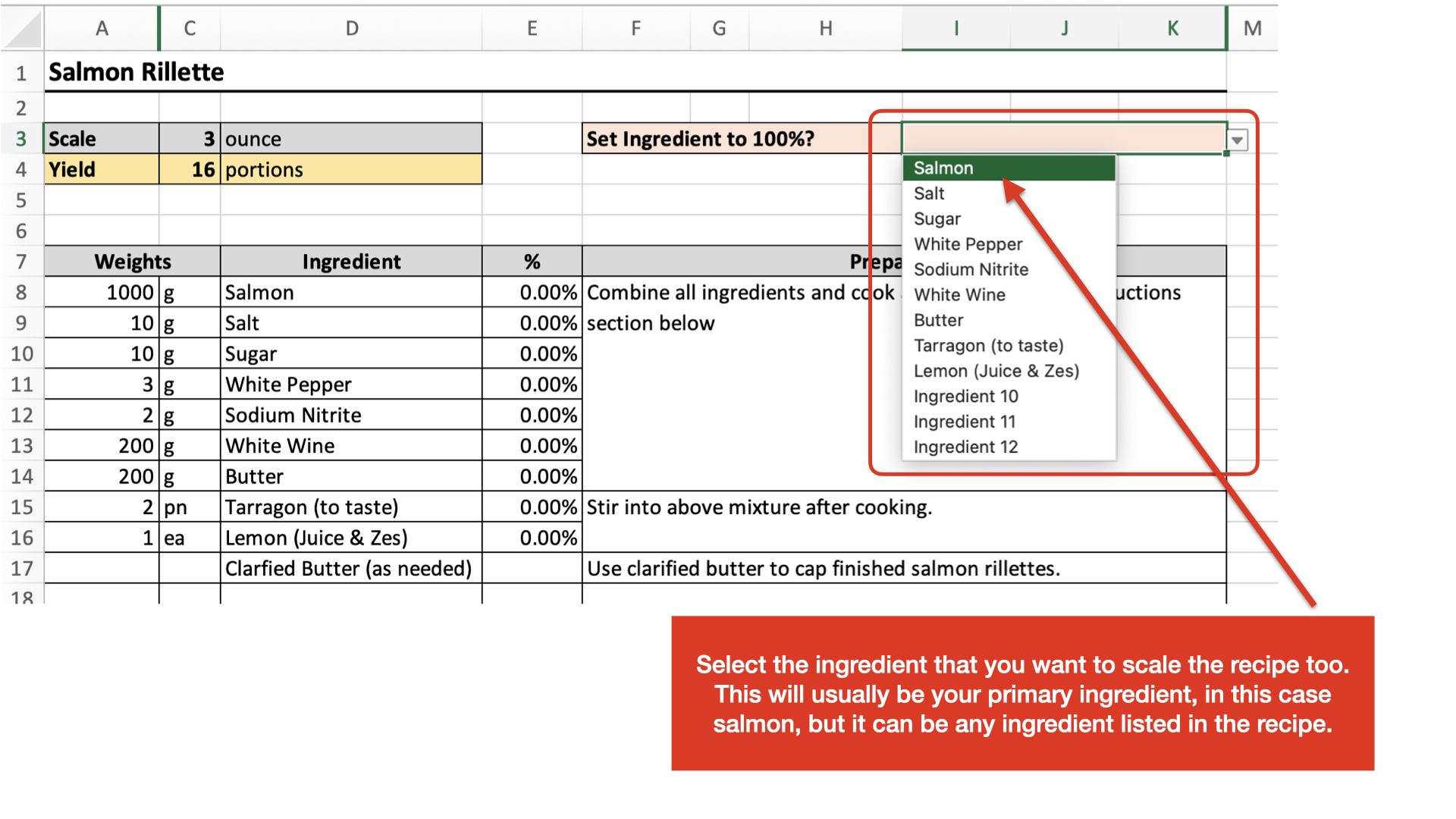
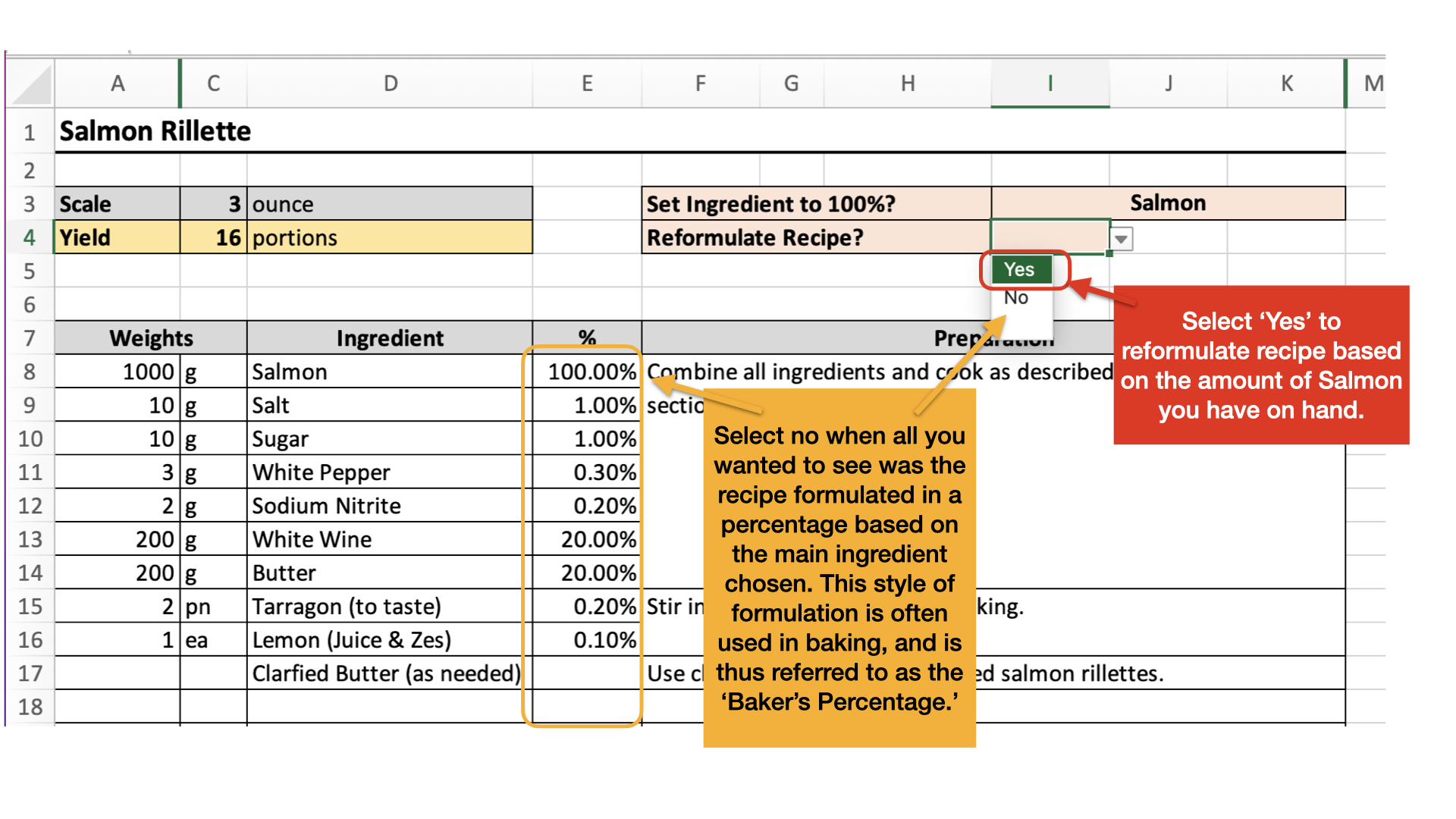
To start the reformulation process, set your main ingredient to 100%. Once you do, the percentages for the remaining ingredients will be automatically calculated.
After setting the main ingredient, you’ll see a drop-down menu labeled “Reformulate Recipe.”
If you want to reformulate: Select “Yes” to update the recipe based on your new main ingredient amount.
If you’re just reviewing ingredient ratios: Leave the box blank or select “No.” This option allows you to check the percentages without changing the recipe.
Entering the New Ingredient Weight
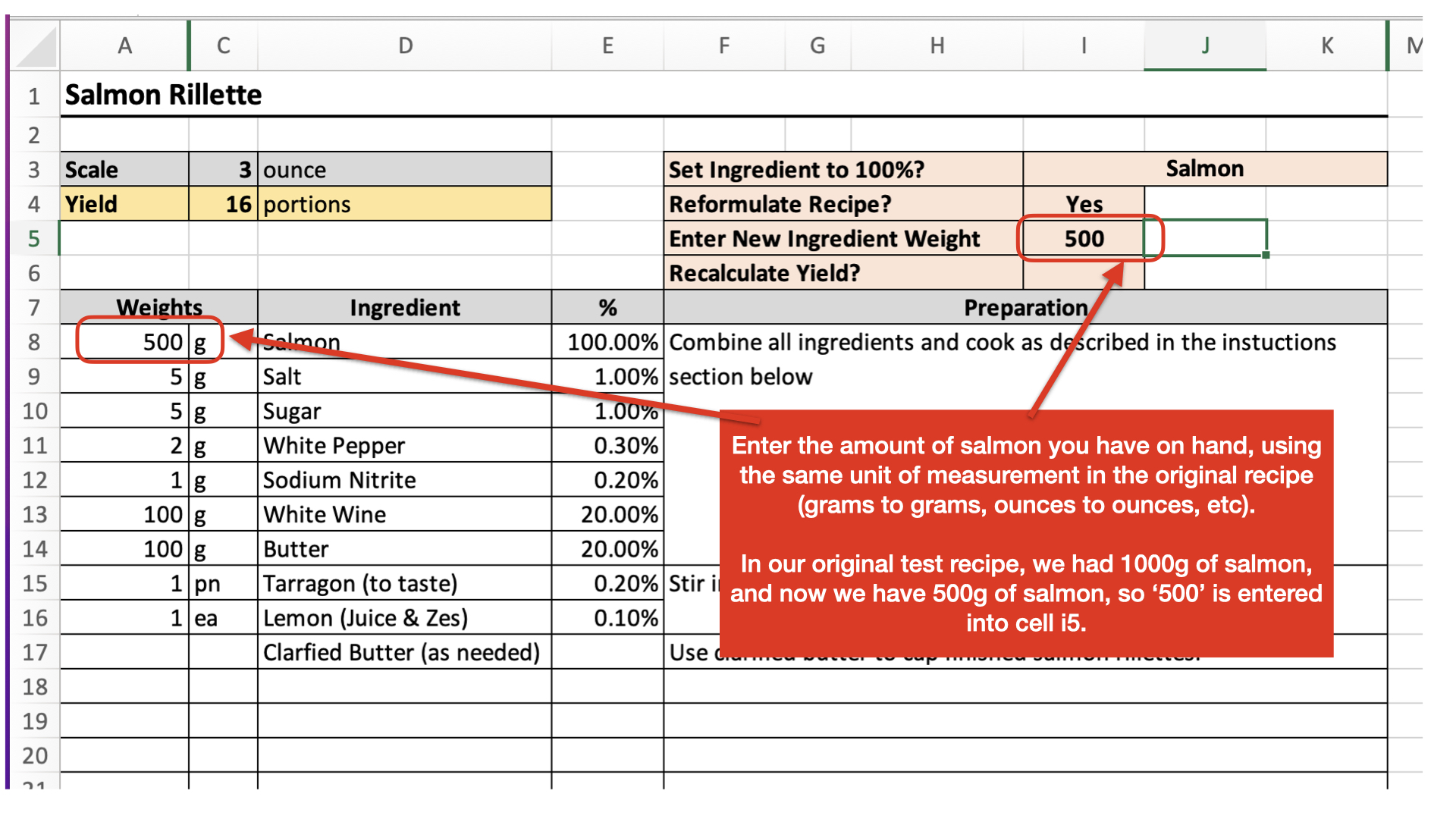
When you select “Yes” to reformulate, a new input box will appear where you can enter the new weight for your main ingredient.
Pro Tip: Ensure that the new weight matches the unit of measurement used in the original recipe (e.g., grams to grams, ounces to ounces).
Once you’ve entered the new weight, the recipe will automatically scale—adjusting all ingredient amounts to maintain perfect ratios.
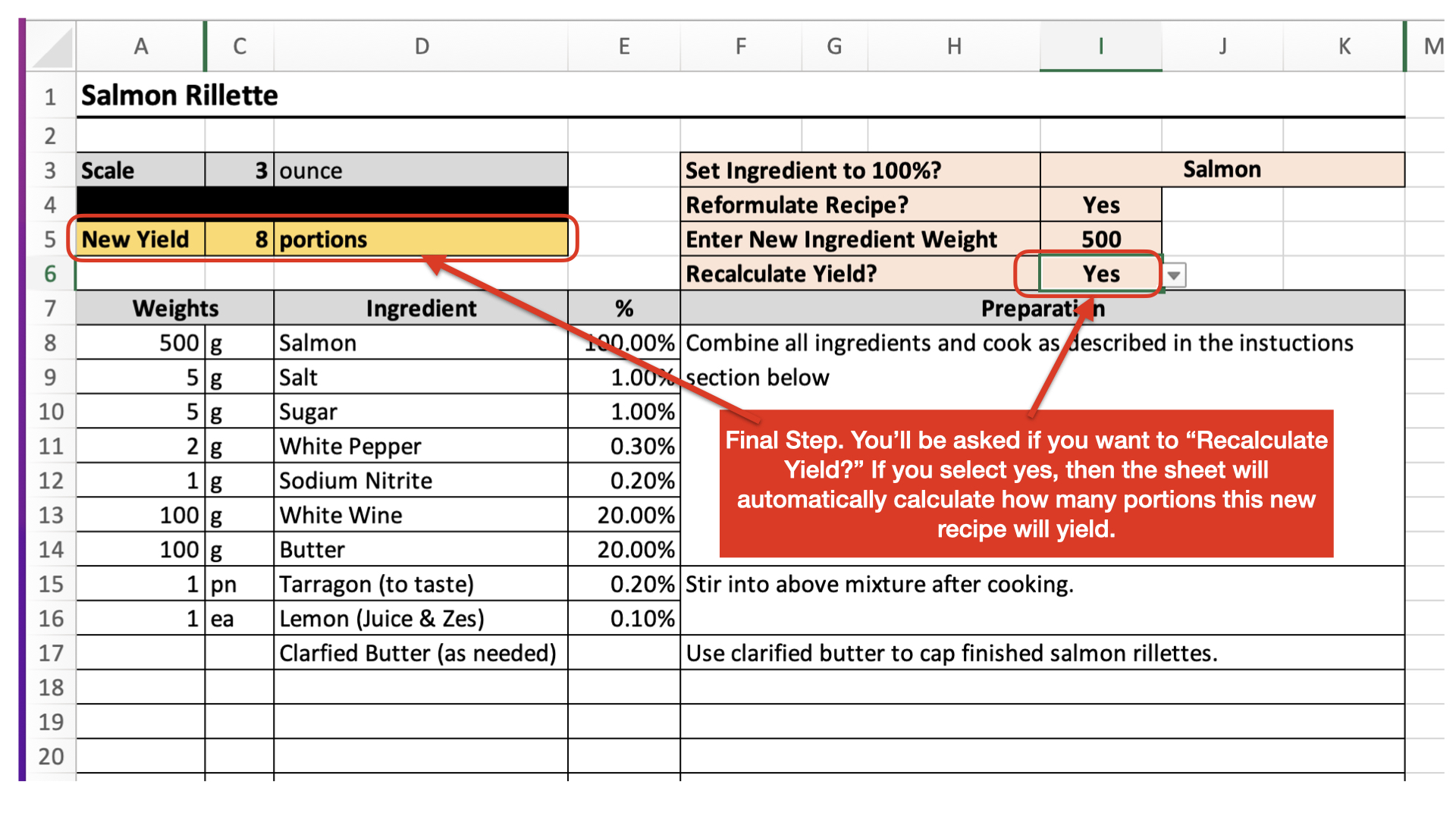
Adjusting Yield
After scaling the recipe based on the new main ingredient weight, you can further refine the yield by selecting “Yes” in the “Recalculate Yield” drop-down menu.
Example Use Case
Let’s say you have a loyal customer who always orders the salmon rillette as a 3-ounce first-course portion at your restaurant. Now, this same customer is hosting a corporate event for 200 guests and requests the rillette be served as a canapé—a small bite on a cracker.
They’ve requested 1.5 canapés per guest, meaning you’ll need 300 portions in total.
Instead of recalculating everything by hand and risking an error, simply enter 0.5 ounces in the Scale Section and 300 in the New Yield box. The recipe calculator will do the rest—adjusting all ingredients automatically.
Practical Uses of the Recipe Calculator
This tool lets you seamlessly scale recipes for a variety of real-world kitchen needs:
-
Entrée to Tasting Portions: Scale down larger portions for tasting menus or amuse-bouche courses.
Example: Turning a 6-ounce braised short rib portion into 2-ounce tasting bites for a five-course dinner.
-
Soups: Convert first-course soup portions into entrée-sized servings.
Example: Scaling a 4-ounce appetizer portion of butternut squash soup to a hearty 12-ounce main course for lunch service.
-
Family-Style Platters: Adjust recipes for shareable dishes.
Example: Scaling a single pasta portion recipe up to serve a table of 10 for a family-style presentation.
-
Dessert Samplers: Resize recipes to create mini portions for samplers or tasting flights.
Example: Shrinking a classic 8-inch cheesecake recipe into 2-ounce mini bites for an upscale dessert platter.
-
Catering and Batch Cooking: Scale up recipes to feed large groups or prep ahead for events.
Example: Preparing 500 canapé-sized portions of chicken liver pâté for a wedding.
-
Personalized Meal Prep: Scale down recipes for precise single servings.
Example: Reducing a full quiche recipe to a single-serve portion for individual meal prep.
By removing the guesswork from the reformulation process, you don’t need to be a math whiz or percentage expert. You’ll always get the exact yield you need—whether you’re batch cooking for a banquet or tweaking a personal recipe for one.
With this recipe workbook, you’re unlocking professional-level precision, speed, and flexibility in your kitchen workflow. No endless scrolling through life stories, no confusing calculations—just the tools you need to become a master of your craft.
PS: A Quick Note on Recipe Instructions
Nothing annoys me more than recipes with overly detailed instructions that treat you like you’ve never stepped foot in a kitchen. It makes the recipe seem more complicated than it is and impossible to quickly scan for the overall gist. I get that there’s an audience for those kinds of recipes—but these aren’t for them.
These recipes follow the same format and style I use in my professional kitchen. They’re not dumbed down.
That said, they’ll still be simple and easy to follow if you’ve completed the course material. If you’re new to the techniques, flavor structures, or food science, don’t skip the associated lessons—they’re there for a reason. Each recipe is paired with a detailed written lesson, podcast, video walkthrough, or course, and you’ll find links to these lessons in the index tab of the workbook.
Also, please don’t email me with “I don’t like black pepper—can I leave it out?”
Yes. Yes, you can. That’s called cooking. Change the seasonings and flavor structures however you like—just don’t mess with the active ingredients or the ratios that make the recipe work.
“But Jacob, how do I know which ingredients are active and which are just there for flavor?”
It’s all laid out in the lessons, my friend. That’s how you know you can’t leave egg yolks out of your mayonnaise or swap 100% whole wheat flour for bread flour in your country sourdough boule—unless you’re going for a broken oil sauce or a loaf that could double as a doorstop.
FAQ: Common Questions About the Recipe Calculator
Q: Can I use the recipe calculator if I don’t have Excel?
A: Absolutely. While Excel offers the best experience, the workbook is compatible with Apple Numbers and Google Sheets, both of which are free to use. Just upload the file to your preferred software, and you’re good to go!
Q: How do I know which ingredient to set at 100%?
A: The primary ingredient—typically the main protein or base—is set at 100%. For example, in the salmon rillette recipe, the salmon trim is set to 100%, and the rest of the ingredients scale accordingly.
Q: Can I scale a recipe up or down without changing the ratios?
A: Yes! Simply adjust the portion size or yield, and the workbook will automatically maintain the correct ratios so your recipe stays balanced.
Q: What happens if I accidentally change an active ingredient?
A: You might end up with a failed recipe (or something that looks like it belongs in a science experiment). Active ingredients are essential for the structure of the dish—like eggs in mayonnaise or flour in bread. Stick to the ratios, and you’re golden.
Q: Is there a way to save my changes without overwriting the original recipe?
A: Definitely! Duplicate the blank tab or save a new copy of the workbook. This way, you can create as many versions as you like without altering the master file.
Q: Can I reformulate recipes for desserts or drinks?
A: Yes! The recipe calculator works for everything from pâtés and pastries to custom syrups and cocktails. Just make sure you’ve set the correct base ingredient at 100%.